
Audit evidence for your AWS accounts, on your own machine, in ten minutes.
A pass/fail verdict for every control of CIS, ISO 27001, SOC 2, NIST CSF, NIS2 and PCI DSS. A report the board can read. Your external attack surface. What changed since last week. Nothing leaves your laptop but the read-only AWS API calls of the scan itself.
- CIS v5.0.0 recommendations evaluated
- 60 / 63
- frameworks every finding is cited against
- 7
- read-only checks across 23 AWS services
- 96
- sent to any vendor, ever
- 0 bytes
Every finding cited against
- CIS AWS Foundations v5.0.060 of 63
- AWS Foundational Security Best Practices52
- ISO/IEC 27001:202227
- SOC 222
- NIST CSF 2.039
- NIS271
- PCI DSS v4.09
Findings are cheap. Evidence someone can act on is not.
The free scanners give you a list. The people who read your report need verdicts, change, and a plan.
Pass/fail with evidence
A control passes only when its checks ran over real resources and raised nothing. Otherwise it says not applicable, not evaluated with the missing permission named, or manual. Per account across an organization.
What changed
Every scan is compared with the previous one: new, resolved, still open, and how long each finding has been open. Weekly in Slack or Teams, or as a failed pipeline when something new appears.
A report for the board, a sheet for the auditor
Executive summary, what changed, compliance verdicts per framework, a remediation plan grouped by check with every affected resource, methodology, appendices. Plus the controls as a CSV for the evidence workbook.
Your external attack surface
Every hostname on your domain from public certificate logs, expiring certificates, dangling DNS, and subdomain takeover confirmed against provider fingerprints rather than guessed from DNS.
A score you can defend
Severity-weighted, normalised by the size of your estate so a few findings cannot floor a large account, weighted by the criticality your own tags declare. The method is printed in every report.
Desktop app and headless CLI
One installer for macOS, Windows and Linux. The same binary runs from cron or CI with exit codes, sharing one local database, so scheduled runs appear in the dashboard.
The product, and the report it produces.
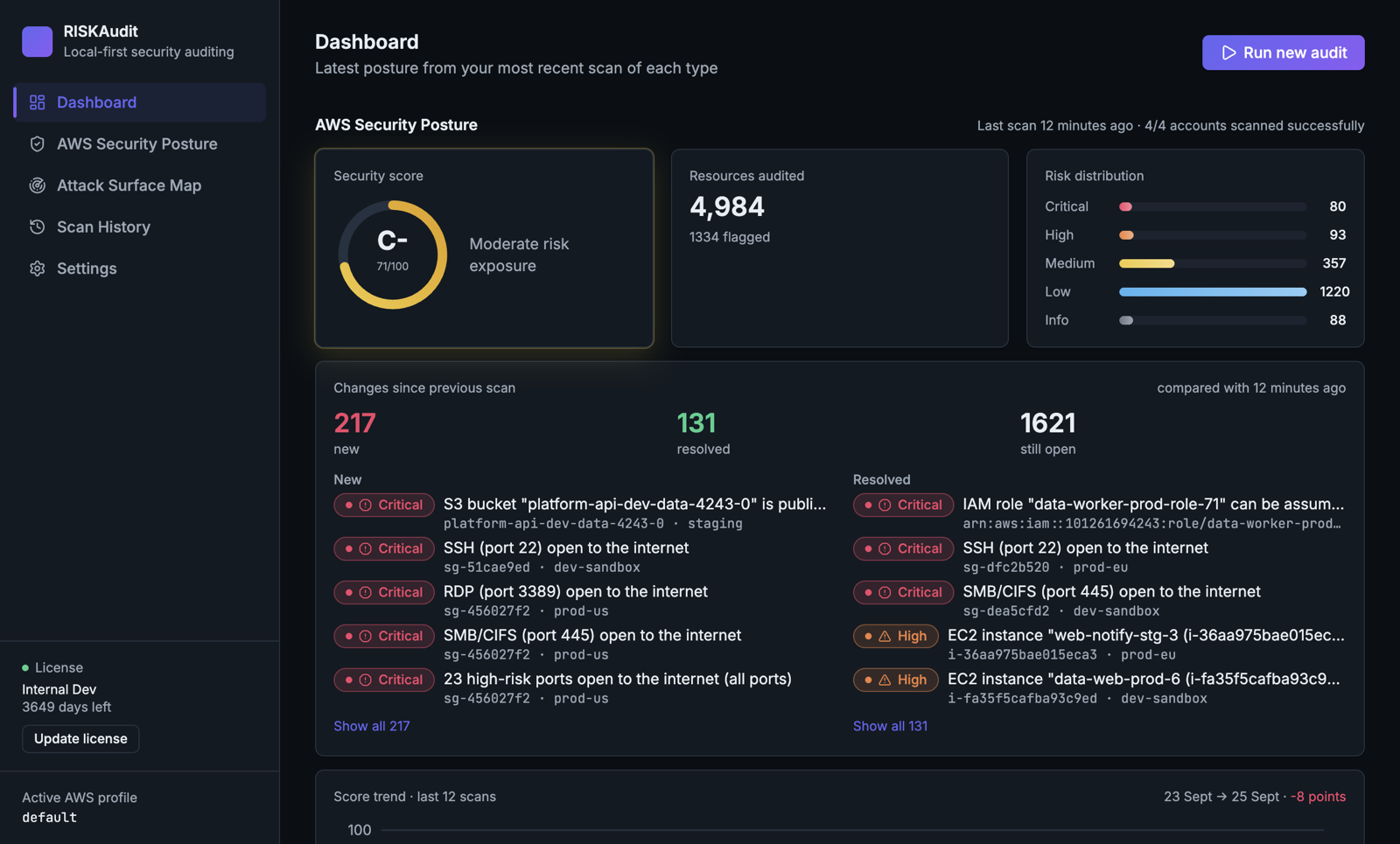
Screenshots and a complete sample report from a fabricated four-account organization. The product can generate one for demonstrations; no real account is shown.
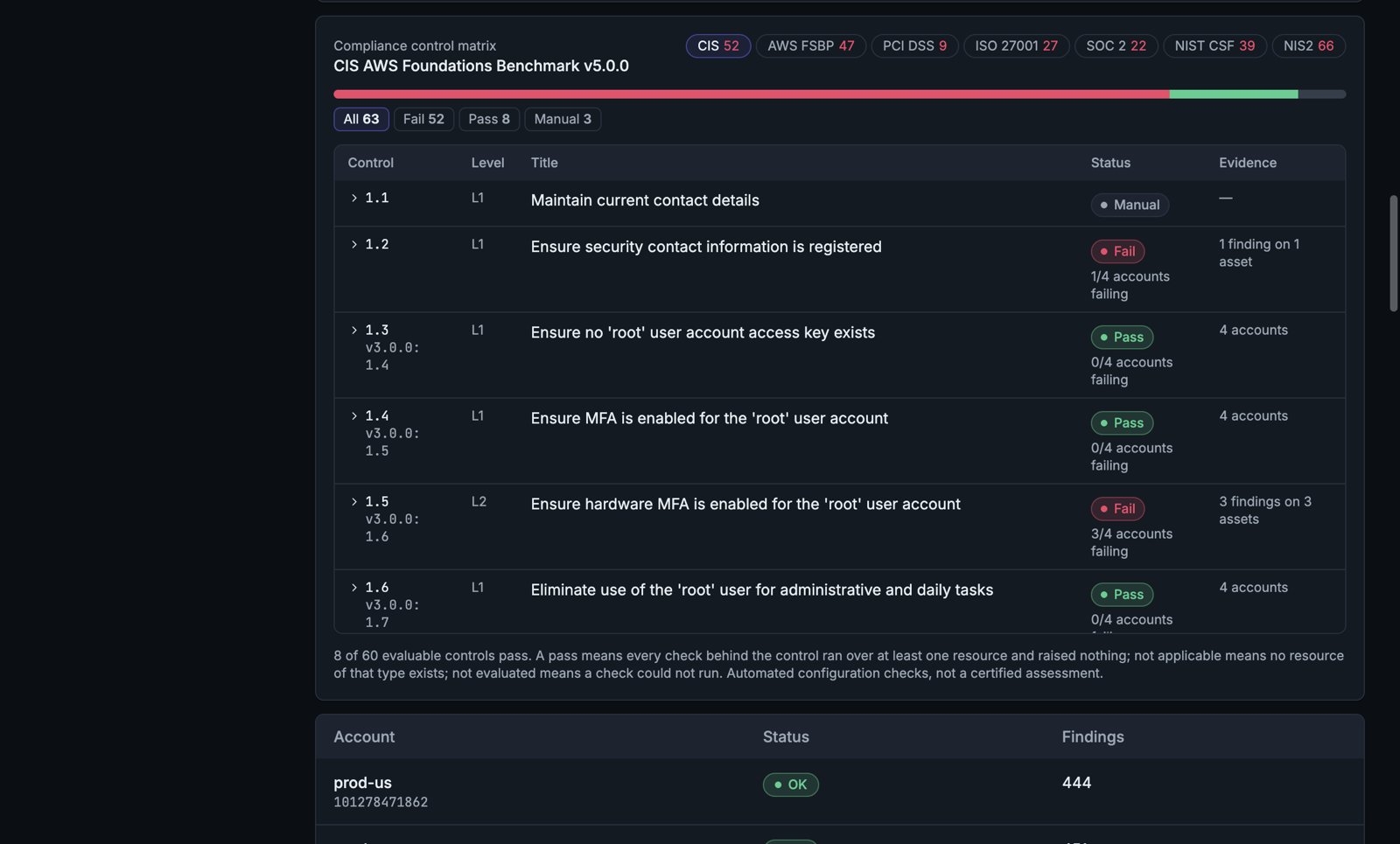
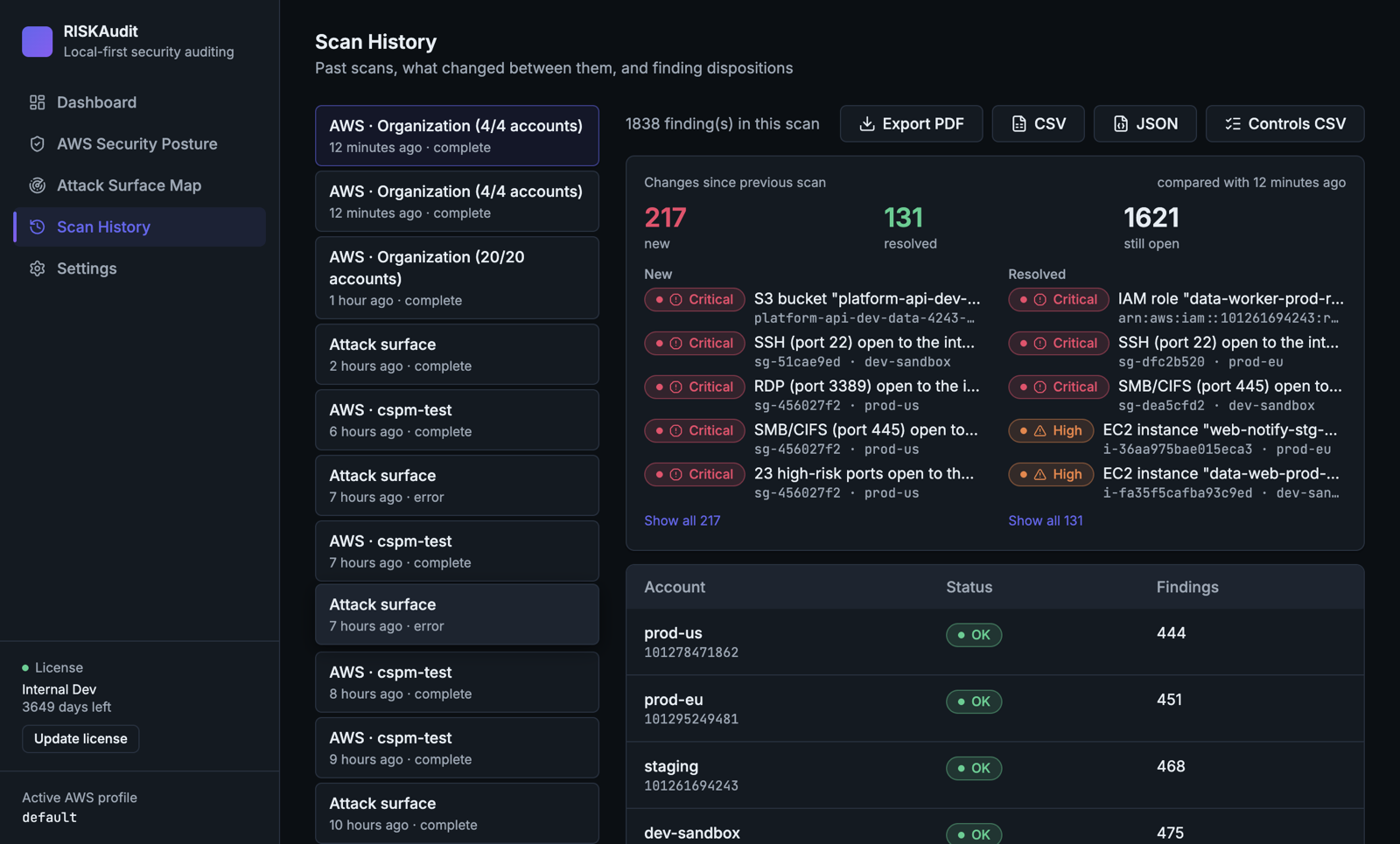
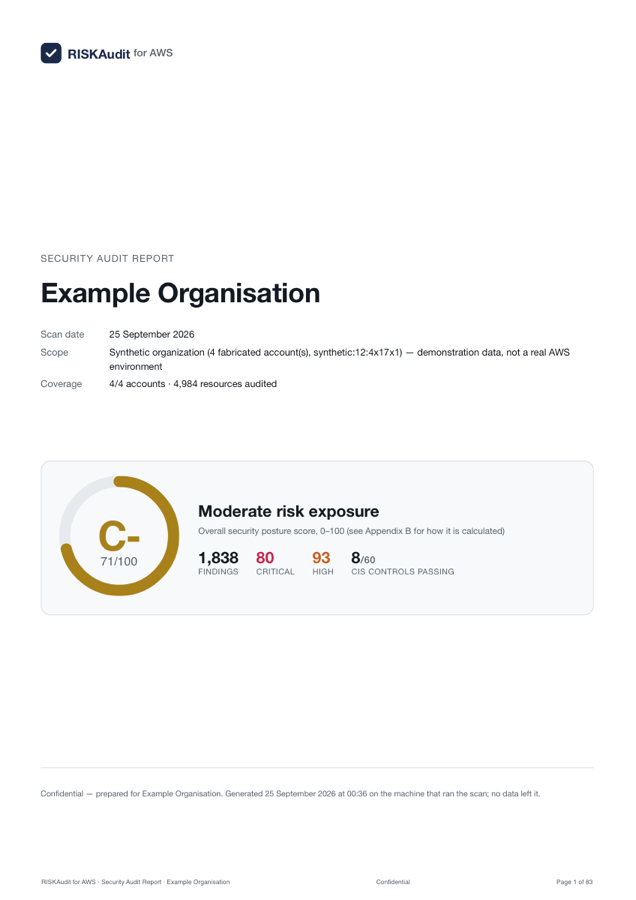
83 pages, written for the board and the auditor
Cover with the grade, a plain-language executive summary with charts, what changed, compliance verdicts for every framework, a remediation plan by check, and appendices with the method and a glossary.
Nothing, except the scan itself.
Every SaaS scanner needs a role into your account and a copy of your findings on someone else's servers. RISKAudit runs where your credentials already are.
- AWS APIs, read-only
Using your own AWS CLI profile. The permission list is published and contains only Describe, Get and List actions. No resource is ever modified.
- Public certificate logs
Only during an attack-surface scan, to enumerate hostnames under your own domain.
- Your own hostnames
One unauthenticated request to a hostname whose DNS points at a takeover-prone service, to confirm whether it is unclaimed.
- Webhooks you configure
Slack, Microsoft Teams or your own signed endpoint. Nothing is sent anywhere you did not enter.
- A role into your account
- Your findings or scan history
- Telemetry or crash reports
- License or update checks
- Any vendor endpoint at all
The license is a signed file verified against a key inside the app. Updates are installers you download and verify yourself; there is no update channel to hijack.
Ten minutes from download to a first report.
- 1
Install and activate
One installer for macOS, Windows or Linux. Paste the license file; it is verified offline and never calls home.
- 2
Point it at a read-only profile
Create the published IAM policy, attach it to a profile, pick the profile. One account, or the whole organization through a role in each member account.
- 3
Read the verdicts, export the report
Dashboard, control matrix, what changed. Export the PDF and the controls CSV. Schedule it weekly, or run the CLI from cron or CI.
Why not just run Prowler?
Because the free tools are good, this deserves a straight answer. If you have an engineer who already runs Prowler, ScoutSuite or Steampipe, keep doing so. RISKAudit is for the organisation that needs the evidence and the report rather than the raw output, does not have that engineer, will not grant a SaaS vendor a role, and wants someone accountable for the result.
| Capability | RISKAudit | Prowler CLI | Prowler App | Steampipe + Powerpipe |
|---|---|---|---|---|
| AWS checks | 96 | 500+ | 500+ | 500+ |
| Pass/fail per control, with the missing permission named | ||||
| What changed since the last scan, with open-since dates | ||||
| Board-ready PDF with a remediation plan | ||||
| External attack surface, confirmed takeover | ||||
| Score with tag-based criticality | ||||
| Install | one installer | Python + pip | Docker, Postgres, Valkey | binaries + plugins |
Counts are approximate and change with every release. Prowler checks hundreds of things RISKAudit does not; the full comparison says where.
Start with your own account, today.
Priced for the organisation that would otherwise pay for an external assessment every year and still not know what changed the week after.
The only thing we ask for is your verdict on the report.
- Your own laptop, your own account
- Every feature, every framework
- The one-pager, the comparison and the security questionnaire
- No credit card, no call required
One price, however many accounts and regions you have.
- Unlimited accounts and regions in one organization
- Desktop app and headless CLI
- Updates and support for the year
- A vendor accountable for false positives and missing checks
The ones every evaluation asks.
We already have Security Hub. What does this add?
Keep it on; our checks cite its control ids. Security Hub is per region, costs per check, and produces neither the cross-framework evidence table nor the report nor the external attack surface. RISKAudit will also show you the regions where it is not enabled.
Can it scan our whole organization?
Yes. Deploy a read-only role to the member accounts and point the scan at the management profile; every account is scanned in every enabled region and judged separately in the control matrix.
What does it store, and where?
Scan history, findings, evaluation evidence, dispositions, schedules and webhook settings in a SQLite database in your user profile directory. Nothing is stored anywhere else. It relies on your disk encryption, which we recommend as a baseline for any machine that holds findings.
Is the installer signed?
Not yet. Builds are currently unsigned while code-signing certificates are in progress, and the installation guide documents the operating-system prompts. We would rather say so here than have you discover it.
How are the control numbers sourced?
Never from memory. CIS numbers are verified against AWS Security Hub's published mapping and the benchmark files, AWS FSBP against the Security Hub controls reference, and the other frameworks are generated from Prowler's Apache-licensed mapping files with the source commit recorded. A check with no confident published counterpart carries no citation.